
Health · Nonprofit
Fundación Niños sin Dolor
A surgery status board for families, and a silent auction that sold every lot
Read the case studyImagine you are a DevSecOps engineer and an alert tells you that one of your application servers shows multiple failed login attempts. Is it just a forgotten password, or is someone trying to break in?
In this blog post, we'll investigate a possibly compromised EC2 instance and determine whether a breach actually happened.
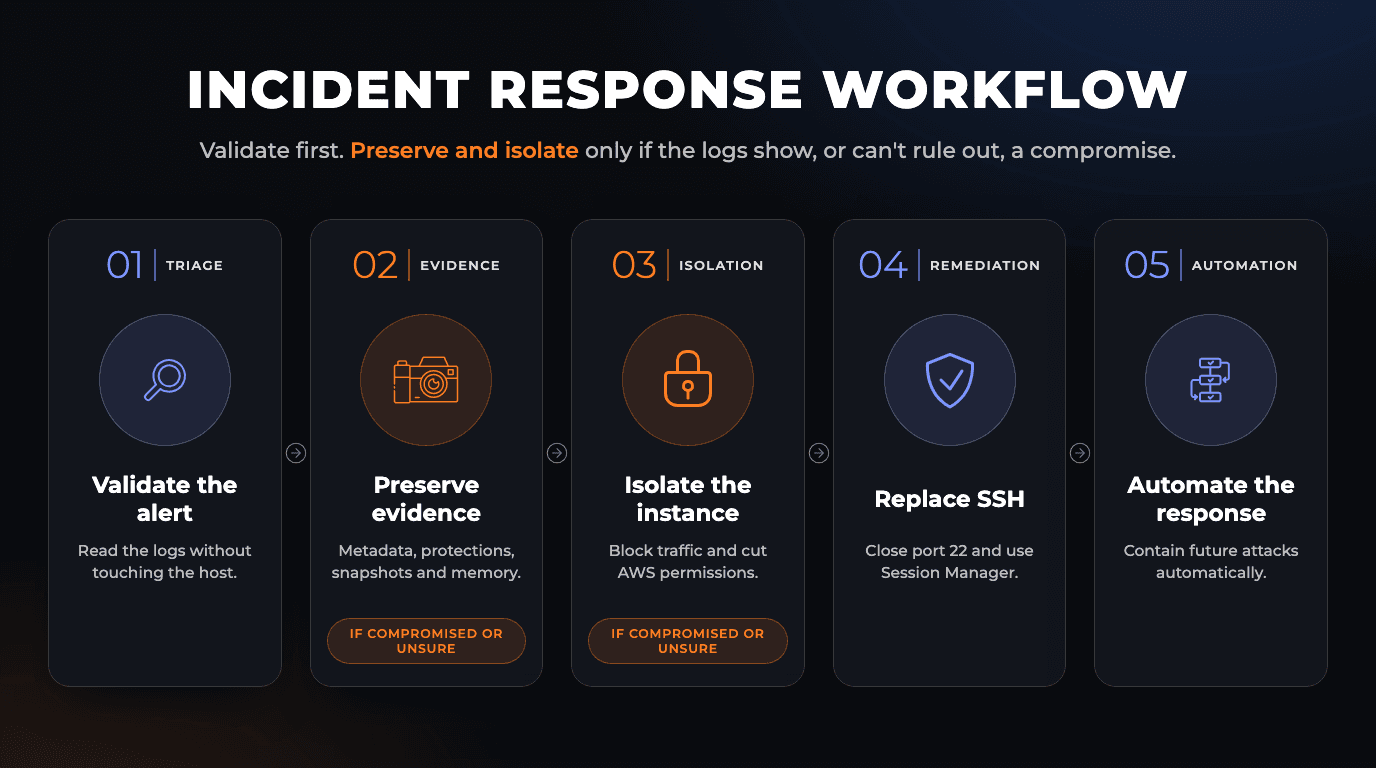
Our workflow starts by validating the alert in the logs, without touching the server. Only if the logs show a successful login, or can't rule one out, do we preserve the evidence (instance metadata, termination protection, disk snapshots and a memory dump) and isolate the server. Either way, we close the gap the attacker used, and we finish by building an automated incident response pipeline to speed up future mitigations.
Here is an overview of the current architecture:
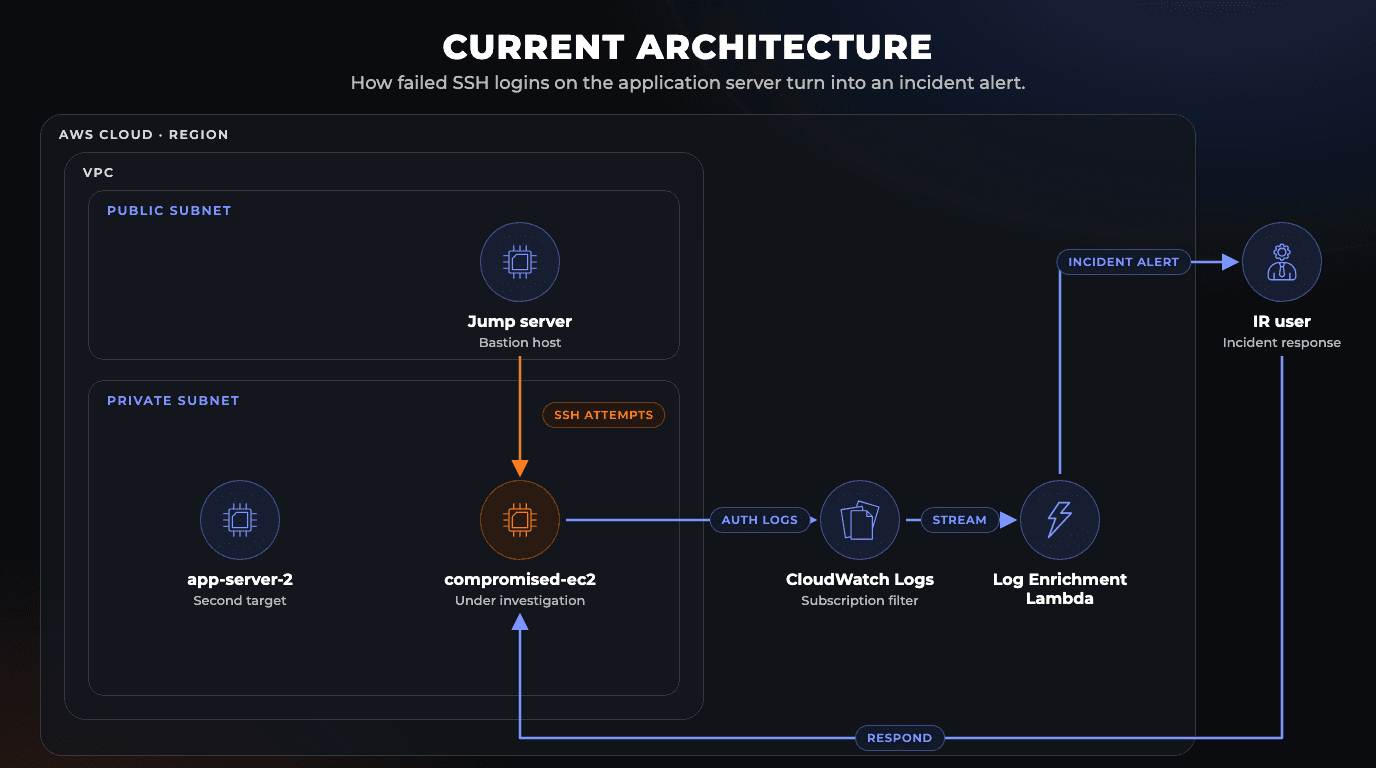
Architecture Overview: An Amazon VPC is split into a public and a private subnet. Administrative traffic enters through a jump server (bastion host) in the public subnet and reaches the private tier, where the compromised EC2 runs next to a second application server, app-server-2, used later to test the automation. The compromised instance ships its authentication logs to CloudWatch Logs, where a subscription filter streams them to the Log Enrichment Lambda.
Panic is the enemy of forensics. When multiple failed logins light up your dashboard, your first instinct might be to pull the plug, but doing so destroys evidence and lets the attacker hide their tracks. Taking a production server out of service isn't free either, and it can be hard to roll back. So validate the alert first, then decide how far to go.
Start with what you can check without touching the host. For an authentication alert such as repeated SSH failures, the events are already in Amazon CloudWatch Logs, as long as the host streams its authentication logs to a log group. Reading them doesn't change the instance, destroy evidence or tip off the attacker.
Note: This scenario uses CloudWatch Logs, but many environments forward these events to a SIEM platform such as Splunk or Datadog for correlation.
Open the log group that collects the host's authentication logs, choose the log stream for the instance ID, and filter for Failed password or authentication failure. Dense clusters of timestamps, the same usernames tried repeatedly and unexpected source addresses on port 22 point to an automated SSH brute-force attack.
The critical question is whether any attempt succeeded, so also search for Accepted password or Accepted publickey from the same sources. Failed attempts alone indicate an attack; a successful login after a burst of failures indicates a compromise. A CloudWatch Logs Insights query shows both in one view:
fields @timestamp, @message
| filter @message like /Failed password|Accepted (password|publickey)/
| sort @timestamp desc
The authentication logs only show what the host sent, so if you have them, also check VPC Flow Logs for the instance's traffic and CloudTrail for API calls made with its IAM role. Then:
Before altering network rules or touching the workload, freeze the host's state and preserve its volatile and persistent artifacts.
Before you change anything, record the instance's current state (network interfaces, security groups, IAM role and attached volumes) and store it in a dedicated incident response S3 bucket.
Stop. Termination protection doesn't cover a shutdown run inside the operating system: with the behavior set to Terminate, that shutdown still terminates the instance.DeleteOnTermination to false on every attached EBS volume. On a running instance, change it with the AWS CLI or AWS Tools for PowerShell.Standby: Auto Scaling doesn't health-check instances in Standby, and entering it also deregisters the instance from the group's load balancers. Unless you decrement the desired capacity, Auto Scaling launches a replacement to keep the service running.Create a snapshot of every EBS volume attached to the instance. Do it before the memory capture in Step 2.4: the capture tool runs on the host and can write its dump to that same disk, so this first snapshot keeps the disks as you found them.
Snapshots preserve the disks, not the memory. To capture it without changing the host through an interactive session such as SSH, trigger memory acquisition remotely with AWS Systems Manager (SSM) Run Command: the SSM Agent on the instance runs scripts that load a third-party memory acquisition tool, one that dumps the contents of the instance's RAM to a file, without anyone logging in. If the tool writes the dump to the instance's disk, take a second snapshot of that volume afterwards so the dump is preserved too.
This only works if the instance is already managed by Systems Manager, with the SSM Agent running and Systems Manager permissions, typically the AWS-managed AmazonSSMManagedInstanceCore policy in its instance profile. Do it before Step 3: once the instance profile is detached and the quarantine security group blocks outbound traffic, Run Command can no longer reach the host.
For a deep analysis, work from the snapshots in an isolated forensic VPC, ideally in a dedicated forensics account: create volumes from them and attach those to a clean forensic workstation. There you can scan for malware and trace the root cause without touching the original workload. The AWS Security Incident Response Guide doesn't recommend launching a copy of the instance as a standard approach. Keep it for cases where you need to watch the instance running, by creating an AMI from it and launching it in a sandbox that is fully isolated and instrumented for monitoring (for example, with VPC Flow Logs or VPC Traffic Mirroring). To share encrypted snapshots with another account, they must use a customer managed KMS key that you share as well. Snapshots encrypted with the default AWS managed key (aws/ebs) can't be shared, so copy them with a key you own first.
Once the evidence is safely stored, isolate the server so the attacker cannot move to other systems or access AWS services.
Add a tag such as Status: Quarantined-server. It marks the instance for the whole team, and tags can also trigger automation.
Depending on how your environment is built:
Block network traffic: swap the instance's security groups for Quarantine-SG, a group with no inbound or outbound rules. A new security group starts with a rule that allows all outbound traffic, so delete it. The swap only changes the primary network interface, so repeat it on any secondary interfaces.
Keep in mind: changing security groups doesn't interrupt connections that are already tracked, so an attacker's open session can survive the swap. To cut established connections, add a deny rule to the subnet's Network ACL (NACL), scoped to the attacker's source IP addresses so you don't cut off neighbouring workloads, or stop the instance. A NACL only filters traffic entering or leaving the subnet, so it can't stop an attacker in the same subnet.
Revoke AWS permissions: detach the IAM role (instance profile). That stops the instance from getting new credentials, but credentials already issued remain valid until they expire. If you suspect they were stolen, use Revoke active sessions on the role and review CloudTrail for API calls made with them. Revoking affects every session of that role, including other instances that use it.
Remove from load balancers: if the instance isn't in an Auto Scaling group (where Standby already did this), deregister it from its target groups.
Stop the instance once the memory dump is safe, to halt every running process.
The instance sits in a private subnet, but its security group still allowed inbound SSH on port 22. Any host that could reach it inside the network (in this scenario, the bastion host) could keep guessing passwords, which also makes the bastion a suspect worth checking with the same steps.
Rather than filtering SSH more tightly, remove it: replace SSH access with AWS Systems Manager (SSM) Session Manager. Session Manager needs no inbound ports, controls access through IAM, records every session start and end as AWS CloudTrail events and, once you turn on session logging, keeps each session's commands and output in Amazon S3 or CloudWatch Logs.
AmazonSSMManagedInstanceCore policy. If you attach or change the instance profile while the SSM Agent is running, it can take a while to pick up the new credentials; restarting the agent speeds it up.App-SG here). Doing it last means you never lock yourself out.Decision point: If the forensic work confirms a compromise, or can't rule one out, keep the instance isolated until that work is done, then replace it with a new instance launched from a clean AMI, with Session Manager access and no port 22, and terminate the compromised one. If it finds no compromise, harden the instance and return it to service:
AmazonSSMManagedInstanceCore policy, attaching it if it's missing, and attach the role to the instance again. If you stopped the instance, start it.App-SG, then swap Quarantine-SG for App-SG on the instance.Standby, register it with its load balancer again or remove the NACL deny rules if you changed those, and remove the Status: Quarantined-server tag.Private subnets: The SSM Agent has to reach the Systems Manager endpoints over HTTPS (port 443). Either give the instance outbound internet access, which in a private subnet means a NAT device such as a NAT gateway, or create VPC interface endpoints (AWS PrivateLink, the option AWS recommends) for
ssmandssmmessages(plusec2messagesfor SSM Agent versions earlier than 3.3.40.0), which keep that traffic inside the AWS network. The endpoints' security group must allow inbound HTTPS from the instance's subnet. With endpoints, session logging also needs ans3gateway endpoint or alogsinterface endpoint, depending on where the logs go; otherwise sessions open to a blank screen. Without a path to Systems Manager, the connection fails with aTargetNotConnectederror.
Either way, the workload ends up with no inbound management port, access governed by IAM, and the original attack vector eliminated.
Manual triage proves the process, but during a live attack it is slow and error-prone. The first identification and containment actions should run on their own.
Status: Quarantined-server, detaches its IAM role, and swaps its security group for Quarantine-SG.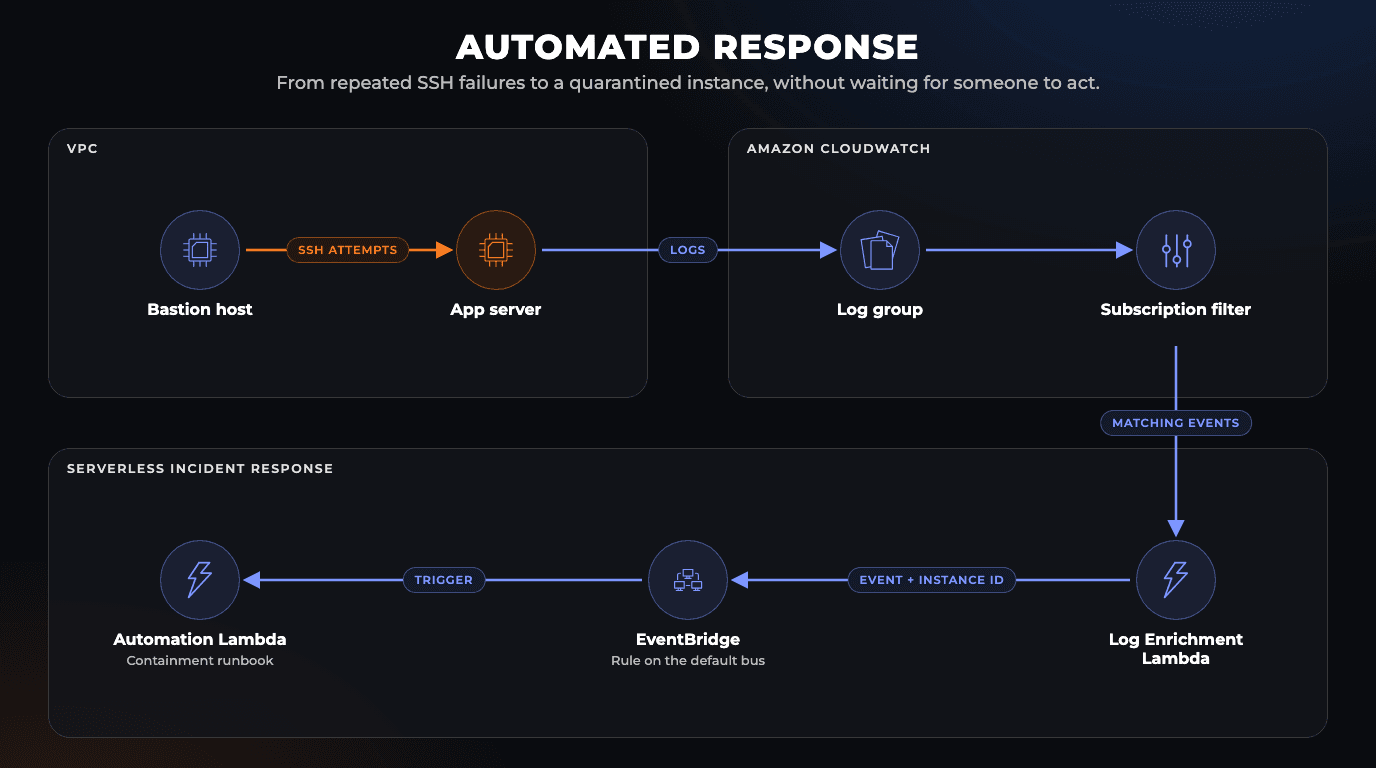
What the pipeline doesn't do: capture memory. Once it swaps in
Quarantine-SG, the SSM Agent can't reach Systems Manager, so the RAM dump from Step 2.4 is no longer possible. It also skips the shutdown-behavior,DeleteOnTerminationand Auto Scaling safeguards from Step 2.2.
Before running this in production: As described, every matching failure triggers the pipeline. It skips the triage from Step 1, so it takes an instance out of service on failed logins alone, a case where the manual workflow keeps it in production, and an attacker could deliberately fail logins to knock your own servers offline. Our design recommendation, not an AWS requirement: add a threshold (for example, a metric filter and a CloudWatch alarm that fire only after a set number of failures within a few minutes) and limit the automation to instances tagged for it, ones that can stay out of service until someone reviews the alert.
source that the Log Enrichment Lambda sets on its events, and make the IR Automation Lambda its target.app-server-2: its IAM role, its security group, termination protection turned off, and no quarantine tag.app-server-2 with a wrong password.app-server-2 again. Termination protection should be on, the quarantine tag attached, the IAM role detached, and the security group replaced by Quarantine-SG. The metadata should be in the evidence bucket, and a new snapshot should appear under EC2 → Snapshots, where it stays pending until all its data has been copied.By combining hands-on forensics with automated serverless remediation, we built an incident response workflow on AWS. In this scenario, we:
Incident response is only as fast as the preparation behind it. If you want to build these runbooks, automate containment, or harden your AWS environment before the next alert, Streaver's platform, DevOps and security engineering services can help. Talk to our team to start the conversation.
A surgery status board for families, and a silent auction that sold every lot
Read the case study
570+ podcast episodes turned into instant, cited answers
Read the case study
Building a $1M product for $125K with a non-technical CEO at the keyboard
Read the case study
Why use TypeScript in 2026? Over 40% of pull requests start with an AI agent. What types catch, where they fall short, and how to set up TypeScript 7.

Alpine.js adds dropdowns, modals, and tabs to server-rendered HTML, no build step. When to use it with Laravel or htmx, and when React or Vue fits better.

A hands-on guide to automating EC2 patching with AWS Systems Manager (SSM) and Patch Manager — from prerequisites and SSM Agent setup to patch baselines, scan associations, and compliance visibility.
Streaver embeds senior product teams inside companies building AI-native software, from whiteboard to live customers.
 Let’s talk with Larry