Case Study · 006Live · founder partnership

Eight windows became one immersive classroom.

Client
Prisma
Sector
EdTech · K-12 online education
Engagement
Build platform · founder partnership
Audience
Children, educators, and parents
Built
Record-time deliveryTBD
Tools replaced
8 generic apps → 1 purpose-built platform
8 → 1Tools consolidated into one classroom
★★★★★From kids, educators, and the founder
Record timeBuild velocity, in the founder's words
TBDActive students on the platformTBD
01A virtual classroom built for the people inside it.

When the tools your kids learn on weren't built for kids, you build new tools.

Audience
K-12 students, families, educators
HQ
United States
Founded around
Virtual school for immersive learning
Engagement model
Build partnership · founder-led
Status
Live in classrooms today

Prisma is a pioneering U.S. virtual school for immersive online learning. When COVID forced school online, Prisma's founder watched what every parent and teacher watched: the tools we already had — Zoom, Google Docs, YouTube, Slides, chat — weren't built for how children actually learn.

Lessons became disconnected windows. Teachers spent more time clicking than teaching. Kids stared at gallery view. Real peer interaction, the part that makes learning stick at this age, almost disappeared.

Prisma's founder had a sharper vision than "better Zoom." A virtual classroom designed from the first pixel for kids — and an engineering partner who could ship the whole thing while the COVID-era opportunity window was still open.

02The Challenge

Four problems, sitting on top of each other.

None of these were solvable by themselves. A better lesson tool without real-time presence is still a worksheet. Real-time collaboration without the right audience is still a meeting app. The product had to address all four at once — and quickly.

01

Eight windows, one lesson

Educators were juggling eight different windows just to run one lesson: video call, slides, docs, polls, chat, whiteboard, file share, breakout room. The act of teaching was getting buried under the act of operating the software.

Disconnected Stack
02

Generic tools, specialized humans

Zoom and Google Suite are built for adults in meetings. Children need avatars, emoji reactions, structured peer interaction, immediate feedback, and a UI that doesn't assume they already know how to drive a desktop computer.

Wrong-Audience Tools
03

Real-time, collaborative, and media-rich at once

A platform that is real-time, collaborative, video-driven, media-rich, and interactive — at the same time — is genuinely hard to build. Each of those features has its own engineering tax. Combining them without the whole thing feeling laggy is the actual product.

Technical Surface
04

Speed without cutting corners

COVID created a once-in-a-generation window for online learning to be reimagined. Slow-shipping the platform would have meant shipping into a different market. The build had to be fast and polished — usually two opposing constraints.

Time-to-Market
Prisma LIVE helps ensure I'm focused on facilitating the best possible workshop for my learners. Everything we need is in one place, and I no longer juggle eight different windows at once!
Educator testimonialEducator · Prisma LIVE
03Selection

Why Prisma's founder picked us.

This wasn't an off-the-shelf build. Real-time video, multi-user collaboration, a custom interactive editor, and an experience polished for children — at speed. Four reasons the partnership clicked.

Complex real-time systems, already done.

Real-time video, live multi-user collaboration, and a custom interactive editor in the same product is a genuinely hard engineering problem. Prisma needed a team that had shipped this category of system before — not one that was going to learn on the founder's dime.

Product polish for a non-enterprise user.

The end users were children, not enterprise buyers. That meant the product had to feel right — avatars, reactions, micro-interactions, the texture of how a click feels. Streaver's bench includes designers and engineers who care about that level of polish, on a product that isn't enterprise software.

Shipping at speed without cutting corners.

The COVID window was open and would not stay open. Prisma needed a partner that could ship at speed without quietly compounding tech debt for the founder to inherit later. That tradeoff — fast and clean — is the entire reason for senior-only teams.

Designers and engineers, on the same team.

A product for kids lives or dies on details that only show up when designers and engineers sit at the same table. Streaver runs both disciplines on one team — not handed off across a wall — so the things the founder wanted to feel right could actually be built that way.

04The Convergence

Eight windows. One classroom.

Every tool below was something an educator had to open, sign into, switch to, and remember to close — sometimes in the middle of a sentence. The product story is the disappearance of that list.

+ Image placeholder

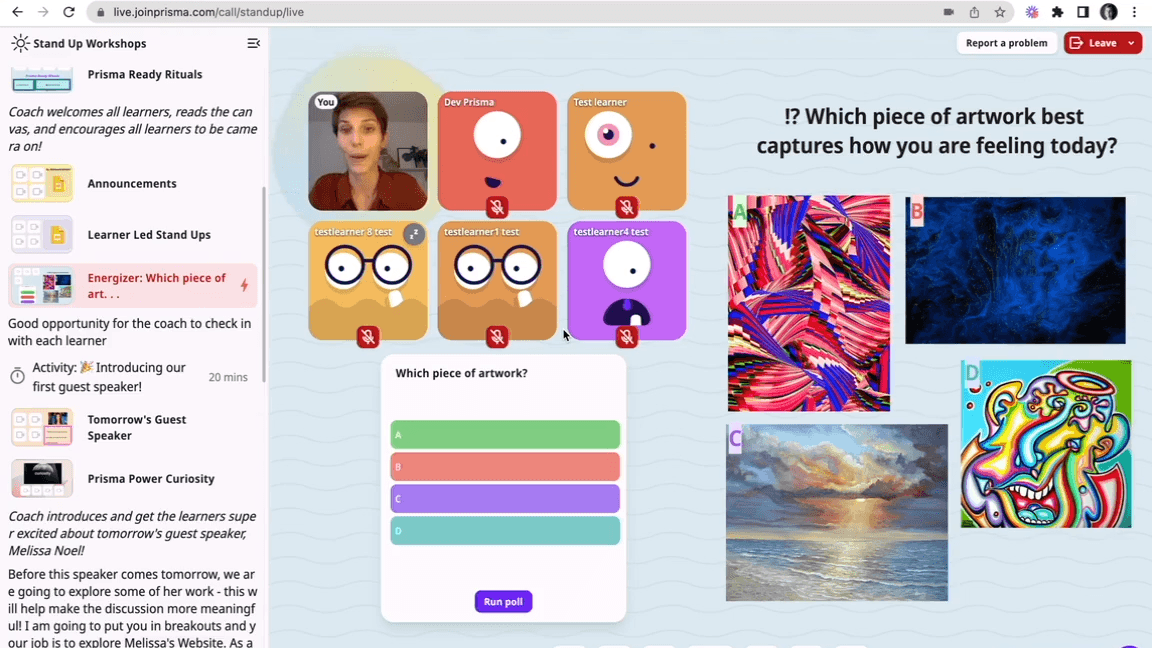
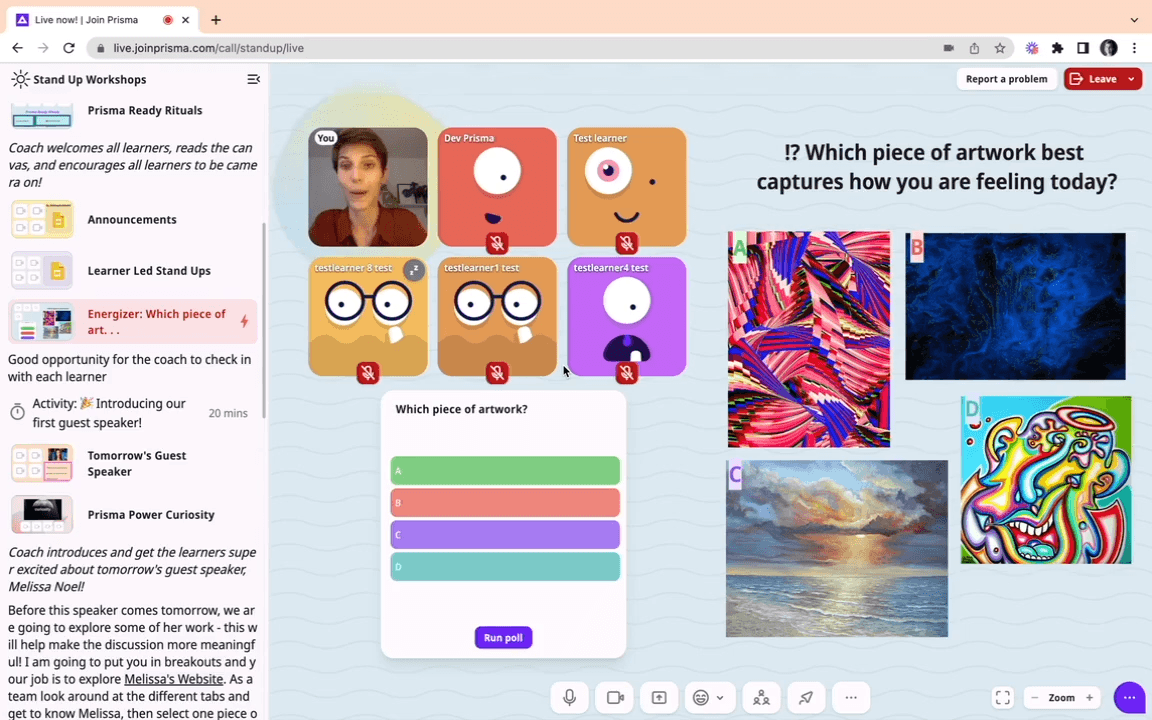
Screenshot of Prisma LIVE classroom in session — full UI with avatars, reactions, lesson editor, and observer-mode breakout rooms visible.

Eight windows → one experience
ZoomGoogle DocsYouTubeSlidesChatWhiteboardPollsFiles

Prisma LIVE

One immersive classroom, designed for kids

05Decisions

Three calls that defined the product.

01

All-in-one platform. No stitching external tools.

The fastest answer would have been to stitch a UX layer over Zoom, embed Google Docs, wrap it all in a portal, and call it a platform. We didn't do that. Every essential learning surface — video, chat, lesson editor, breakout rooms, polls, file share — was built natively into one product. No more tabs. No more context-switching mid-lesson.

WhyChildren don't have the context-switching budget adults do. Every external tab a teacher opens is a tab a seven-year-old has to follow.
02

Real-time collaboration at the core, not bolted on.

Real-time collaboration wasn't a feature we layered on top — it was the foundation we built the rest of the platform on. The lesson editor uses CRDT-style sync so educators can co-author, students can interact live, and the same document is the lesson, the activity, and the artifact. This is the difference between a video-conferencing app with sharing, and a classroom.

03

Observer mode for breakouts — quiet supervision.

Breakout rooms in generic tools force a choice: leave students alone and lose visibility, or hop in and disrupt the dynamic. We built an observer mode — teachers can watch and listen without their presence interrupting the room. Same mechanic kids already use in games. Quiet supervision. The teachers' favorite feature.

SignalObserver mode keeps coming up in educator testimonials. The features kids' teachers reach for in interviews are usually the ones that change their day.
+ Image placeholder

Custom lesson editor walkthrough — short looping screen recording of a teacher co-authoring a lesson with embedded poll, video, and interactive elements.

Watch · Educator testimonial

An educator, in her own words.

Two-minute placeholder for the educator testimonial reel. Same person quoted above; the on-camera version goes here once filmed.

+ Video placeholder
Educator · Prisma LIVE · embed the educator testimonial reel here once filmed.
06Honest

What we'd like to say with numbers, and don't yet.

The qualitative story is unusually strong: five-star feedback from educators, students, and the founder. The quantitative version isn't verified for public use yet — and we'd rather mark that than overclaim.

Scale · not yet quantified

The active-student number is real. The public number isn't yet.

We can describe the product story honestly. We can show the testimonials honestly. We can't yet show "X thousand students learning on the platform today" because that figure hasn't been confirmed with Prisma's team for public attribution. When it is, this page updates.

Engagement · vs. Zoom not measured

We have qualitative proof, not engagement metrics.

Educators, students, and the founder all volunteered that the new platform feels meaningfully better than Zoom. We didn't run a controlled study. We don't have a clean delta on retention, engagement, or time-on-task. Those measurements are the honest next step before we make any quantitative claim.

Timeline · framing > figure

"Record time" is real. The exact week count is being verified.

The founder's word — "record time" — is the framing on this page. We know the build was fast by category norms for a real-time collaborative platform. The exact week count from kickoff to first live cohort is being reconstructed from internal records before we put a specific number on it.

07Outcomes

What changed for kids, teachers, and the founder.

Each outcome is paired with the before-state it replaced. The one outcome tagged TBD is the engagement comparison vs. Zoom — strong anecdotally, not measured rigorously.

Eight windows per lessonOne immersive classroom

One platform replaced the patchwork

Every essential surface — video, chat, lesson editor, breakout rooms, polls, reactions, file share — built natively into one platform. Educators run a class without leaving the product.

Gallery view and a mute buttonAvatars · reactions · polls · observer mode

Designed specifically for children

Children need different signals than adults: visible identity, lightweight expression, structured peer interaction. We built those into the product surface, not bolted them onto a meeting tool.

Educators focused on softwareEducators focused on facilitation

Teacher empowerment

When teachers don't have to operate eight tools, they teach. Quoted in their own words: "Everything we need is in one place, and I no longer juggle eight different windows at once."

Stare-at-gallery-viewReal interaction · immediate feedback

Student engagement

Peer-to-peer reactions, live polls, collaborative lesson surfaces, and observer-mode breakouts changed what classroom presence even means for a remote child.

TBD · engineer to verify
Searching for the right partnerA perfect marriage — founder's words

Founder partnership

Five-star qualitative proof from kids, educators, and the founder himself. The owner has called the partnership a "perfect marriage" — the rarest signal in this kind of work.

Foundation for the first versionFoundation for AI-personalized learning

Built to grow into AI-powered learning

Once the classroom is one connected surface, every interaction is a signal. The same platform is now the substrate for adaptive learning paths, AI tutoring, and pace-aware curriculum — features that simply cannot exist on top of a patchwork of unrelated tools.

Prisma LIVE is cool! It makes learning a lot more fun and interesting than Zoom.
Student testimonialStudent · Prisma LIVE
08The Team

Four Streavers. One founder in the room.

A product for kids needs a team that argues about the texture of a click. The four people who built Prisma LIVE were senior across real-time systems, video, and product design — and the founder was close enough that decisions didn't have to wait for a meeting.

E
Engineering LeadTBD
Engineering Lead

Owned overall architecture, the real-time sync layer, and shipping cadence with the founder. Sat in the founder's weekly product review.

R
Real-time / Video EngineerTBD
Senior Real-time Engineer

Built the live video pipeline, breakout-room logic, and the observer-mode mechanic that became the educators' favorite feature.

F
Frontend / UX EngineerTBD
Senior Frontend Engineer

The kid-UX specialist. Avatars, reactions, polls, the texture of every micro-interaction. Why the product feels like it was made for children and not retrofitted for them.

B
Backend EngineerTBD
Senior Collaboration Engineer

Owned the collaborative lesson editor — CRDT-style sync, chapters and scripts, and the data model that keeps every interaction in one shared document.

How the engagement was structured

Cadence

Weekly founder-product review. Daily standups across the joint team. Demos at the end of every sprint with real users — educators and (politely) their students.

Communication

The founder was deeply involved — present in product decisions, design reviews, and live with users. The communication line was tight, fast, and explicit. The work moved at the pace it did because nobody had to wait for an answer.

Pricing

Milestone-priced build. Each phase scoped, demoed, signed off — then the next phase started. No open-ended hourly meter. The founder always knew what the next deliverable was and what it cost.

Trust model & IP

Full IP transfer to Prisma. Code, designs, infrastructure, accounts, knowledge. A build partnership ends when the product is the client's product — without footnotes.

From architecture to first cohort

WEEK 00Architecture & foundationsFounder vision translated into product architecture. Real-time + collab + media surface decisions made up front — these are the ones that are hardest to change later.
WEEK 06Core video + collaborationLive video pipeline working end-to-end with stable breakouts. CRDT-style document sync working under load. The two hardest pieces, in shape early.
WEEK 12Lesson editor + interactivityCustom lesson editor live. Chapters, scripts, embedded polls, videos, and interactive elements all in one document model. Educators start authoring real lessons.
WEEK 16Polish + usability with kidsUsability testing with actual kids and educators. Avatars, reactions, observer mode, micro-interactions all polished against real classroom behavior — not adult assumptions about it.
WEEK 20LaunchFirst cohort live on the platform. The eight-window era ends for Prisma's educators.
WEEK 28First cohort feedback loopFirst-cohort feedback loop closes. Roadmap reshaped by real classroom telemetry. Foundation for AI-personalized learning takes shape.
09Stack

The tools that make “real-time + collaborative + media” feel calm.

Each of these tools is doing exactly one job, well. CRDT for live document sync. A purpose-built video pipeline for breakouts. Presence in Redis. A design-led frontend that animates like a product made for people, not for meetings.

Languages & Frontend

  • TypeScriptstrict, end-to-end
  • Next.jsApp Router · React Server Components
  • Tailwind CSSfor a design-led product surface
  • Framer Motionmicro-interactions kids actually feel

Real-time & Collaboration

  • Slaterich-text editor as a first-class surface
  • YjsCRDT sync for live multi-user editing
  • Hasurareal-time GraphQL + subscriptions
  • Redispresence, pub/sub, ephemeral state

Video & Infrastructure

  • Vonagevideo pipeline · breakout rooms
  • AWSprimary cloud
  • Dockercontainerized services
10What's Next

From classroom to learning loop.

Once the classroom is one connected surface, every interaction becomes a signal. The next phase of work is about turning those signals into something that quietly improves the experience for every child on the platform.

Adaptive learning — AI personalization on top of the platform.

Once every classroom interaction lives in one connected platform, every interaction is a signal. The next phase makes that visible to teachers and uses it to adapt pace and difficulty per student — a learning experience that personalizes itself without becoming a black box.

Parent engagement layer.

Parents see report cards. They don't see the texture of a kid's learning week. A lightweight parent surface — opt-in, child-respecting — turns the classroom into something a family can engage with, not just receive updates about.

Classroom AI assistant.

An in-product AI assistant scoped to the lesson context — not a generic chatbot. Helps educators prep, students stay unstuck, and surfaces "this student is quietly struggling" before it shows up in a grade.

Building a product for a non-enterprise audience?

Let's make it feel inevitable.

Building a product that has to delight a non-enterprise user — kids, patients, customers? Streaver runs designers and engineers on the same team, ships fast without cutting corners, and partners with founders who actually care about the texture of the thing.

11Continue reading
DELOS AG
Featured
Live

DELOS AG

First paying enterprise customers in sixteen weeks

91% precision · 4-agent systemRead the case study
Supreme Golf
Featured
Live

Supreme Golf

Building a $1M product for $125K with a non-technical CEO at the keyboard

8× lower cost · 3–5 deploys/dayRead the case study